Compare
GIMP vs Photoshop
GIMP 3.2.6 is free and runs everywhere, including Linux. Photoshop costs a subscription and leads on AI and content-aware tools. We checked 171 Photoshop features against GIMP one by one; here is where the difference actually lies, and for which work it matters.
On this page 6 sections
Short answer
Which should you use?
- Photoshop if you are paid for image work, exchange PSD files with others, rely on generative fill or content-aware tools, or prepare CMYK print files every day.
- GIMP if you want a capable free editor without an account, use Linux, or do photo fixes, web graphics and retouching occasionally or as a hobby.
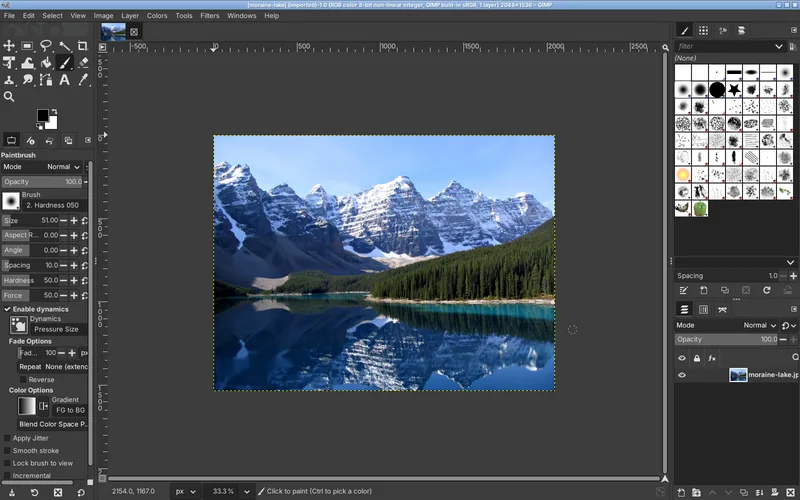
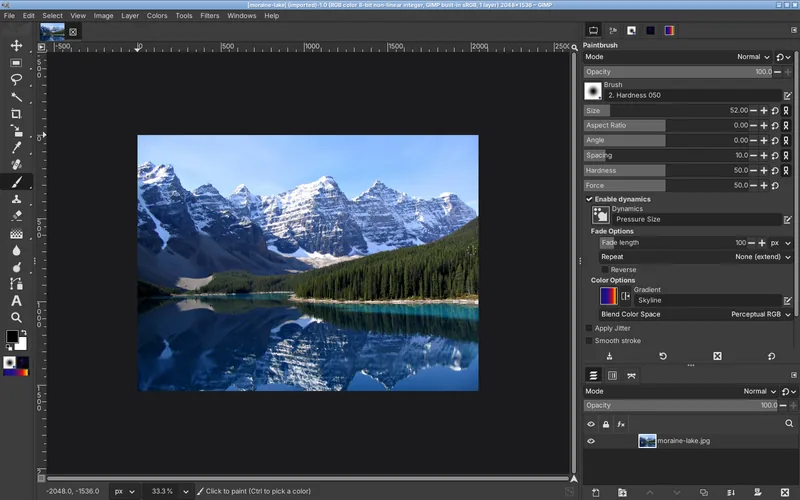
- Coming from Photoshop? PhotoGIMP gives GIMP Photoshop’s shortcuts and toolbox, which removes most of the switching pain. It does not add features.
At a glance
| Compared | GIMP 3.2.6 | Adobe Photoshop |
|---|---|---|
| Price | Free, open source (GPL-3.0) | US$22.99 a month for the Photoshop plan, or US$19.99 a month for the Photography plan with Lightroom (both annual, billed monthly; Adobe’s US prices on October 31, 2026) |
| Account | None | Adobe account and subscription |
| Desktop systems | Windows, macOS, Linux | Windows, macOS (plus web and mobile versions) |
| Free trial | Not needed | 7 days |
| Generative AI | None | Generative Fill and more, using generative credits included in each plan |
| Non-destructive editing | Editable filters on layers, link layers, vector layers (3.2) | Adjustment layers, smart objects, smart filters |
| Color | RGB and grayscale, up to 32-bit float; CMYK soft-proofing and CMYK export in some formats | Full CMYK and Lab editing |
| PSD files | Opens and exports; adjustment layers and live text do not survive | Native |
| Raw photos | Through darktable, RawTherapee or ART | Camera Raw built in |
| Scripting | Python 3, Script-Fu | Actions, JavaScript |
Feature by feature
We listed 171 Photoshop tools and features and looked up each one in GIMP 3.2.6, with menu paths read from GIMP itself. Most everyday features have a direct equivalent; the gap is concentrated in a few areas.
- Same 78 46%
- Close 45 26%
- Workaround 28 16%
- Plug-in 4 2%
- None 16 9%
Same or close in GIMP
- Selections, masks, layer groups, blend modes
- Levels, Curves, Hue-Saturation, Color Balance, Exposure, Shadows-Highlights
- Healing, Clone, Dodge/Burn, Smudge, gradients
- Free Transform (Unified Transform), Liquify (Warp Transform), Perspective
- Blur, sharpen, noise, distort and lighting filters, editable after applying
- Paths (Pen tool), text, guides, grids, snapping
- 16- and 32-bit editing, color management, soft-proofing
Missing or weaker in GIMP
- Generative Fill, Generative Expand, Neural Filters, Sky Replacement
- Content-Aware Fill, Move and Scale (Resynthesizer plug-in covers some)
- Select Subject, Object Selection, Remove Background in one click
- Embedded smart objects, layer styles as a panel, vector masks
- Camera Raw, Color Lookup (LUTs), Match Color, Selective Color
- Artboards, actions recorder, timeline and 3D
- Full CMYK editing
Look up any single feature in the Photoshop to GIMP map.
By kind of work
| Work | GIMP 3.2.6 | Our take |
|---|---|---|
| Photo fixes: crop, exposure, color, sharpening | Fully capable | Levels, Curves and the color tools are all there, and stay editable. |
| Retouching: blemishes, objects, skin | Capable, slower | Healing, Clone and frequency separation work. No content-aware or AI removal, so large removals take longer. |
| Cut-outs and backgrounds | Manual | Foreground Select and masks work, but nothing is one-click. |
| Web and social graphics | Capable | Text, layers, export to PNG, JPEG, WebP and AVIF. No artboards or templates. |
| Print design in CMYK | Limited | Soft-proofing and CMYK export exist, but you edit in RGB. For print work, Photoshop, Affinity or a layout program handle CMYK directly. |
| Digital painting | Good | Pressure, MyPaint brushes, symmetry. Krita is better suited. |
| Team work with PSD files | Risky | PSDs open, but adjustment layers and live text are lost on the way. |
| Generative AI edits | Not available | None in GIMP. |
Cost over time
At Adobe’s US prices on October 31, 2026, the Photoshop plan costs US$22.99 a month on an annual commitment: about US$276 a year, or US$1,380 over five years. The Photography plan, US$19.99 a month, adds Lightroom and costs about US$240 a year. GIMP costs nothing, now or later, and needs no account. Prices change and vary by country; check Adobe’s plans page.
The interface gap, and PhotoGIMP
Much of what makes GIMP feel “worse” to Photoshop users is not features but habits: different tool letters, Free Transform on another key, adjustments under Colors instead of Image. PhotoGIMP moves GIMP’s tools into Photoshop’s order and gives 23 commands Photoshop’s keys, so V, B, Ctrl+J and Ctrl+T do what you expect. We tested it on Windows, macOS and Linux. It does not change anything in the lists above. Our PhotoGIMP review.
Questions
Is GIMP as good as Photoshop?
Is GIMP as powerful as Photoshop?
Can GIMP replace Photoshop?
Is GIMP harder to learn than Photoshop?
Does GIMP have generative fill?
Can GIMP open Photoshop files?
Is Photoshop available on Linux?
Keep going
Found something wrong or out of date? Tell us: hello@photogimp.org. We fix mistakes within a day.