Plug-ins
GIMP plug-ins for Photoshop users
PhotoGIMP changes how GIMP looks and which keys do what. It adds no features and contains no plug-ins. For the Photoshop features GIMP lacks, a few free plug-ins come close. This page lists the ones that matter and whether each has a GIMP 3 version yet.
On this page 10 sections
Short answer
The short version
- Content-aware fill: Resynthesizer, “Heal Selection”. GIMP 3 version available; easiest on Linux through Flatpak, where we tested it.
- Hundreds of extra filters and LUTs: G’MIC-Qt. GIMP 3.2 installer for Windows, zips for Linux, Flatpak.
- Raw photos (Camera Raw): no plug-in needed. GIMP 3.2.6 hands raw files to darktable, RawTherapee or ART if one is installed.
- PSD files and Photoshop brushes: built in. Nothing to install.
- Batch processing (BIMP): no GIMP 3 version announced yet.
What we checked
On Linux we installed GIMP 3.2.6 from Flathub with the GIMP 3 versions of Resynthesizer and G’MIC, checked which menu entries they add and ran Heal Selection on a photo (results below). The Windows and macOS status comes from each project’s own download page and releases, checked on October 31, 2026; we did not install plug-ins there. Plug-ins run code on your computer, so get them only from the official links here.At a glance
| Plug-in | Photoshop feature it replaces | GIMP 3 version | Windows | macOS | Linux |
|---|---|---|---|---|---|
| Resynthesizer | Content-Aware Fill, Remove, Patch | 3.0.1 | no official build | MacPorts | Flatpak |
| G’MIC-Qt | Filter Gallery, Color Lookup, many effects | 4.0.7 | installer | MacPorts, Homebrew | zip, Flatpak |
| darktable, RawTherapee, ART | Camera Raw | built-in support | Install the raw developer itself; GIMP finds it. | ||
| BIMP | Image Processor, batch actions | not announced | Latest release (2.6) targets GIMP 2.10. | ||
Resynthesizer: content-aware fill for GIMP
Resynthesizer fills an area by copying texture from around it, which is what Photoshop’s Content-Aware Fill does. Select the object to remove, a little larger than the object itself, and run Heal Selection. It works best on grass, sky, sand, walls and other irregular textures, and struggles with straight lines and faces, as content-aware tools in general do.
- GIMP 3 version
- Version 3.0.1, which its release notes call “compatible with GIMP 3.0 or later”. The GIMP 3 code lives in the
resynthesizer3branch. - Where it appears
- We saw these in GIMP 3.2.6: Filters → Enhance → Heal Selection…, Heal Transparency… and Uncrop…; Filters → Map → Resynthesize…; and Edit → Fill with Pattern Seamless…. The project’s guide also lists Filters → Map → Style… and Filters → Render → Texture…, which we did not look for.
- Linux
- With the Flathub GIMP:
flatpak install flathub org.gimp.GIMP.Plugin.Resynthesizer//3. The//3picks the GIMP 3 version: Flathub also carries two GIMP 2 versions, and without it the install stops and asks which one. - macOS
- The project points to a MacPorts port. Whether that port is built for GIMP 3 is not stated.
- Windows
- The README says a Windows build “is not tested and not in the repo”. Community builds exist on forums; we do not link them, because we cannot vouch for them.
- Official source
- github.com/bootchk/resynthesizer
The old PhotoGIMP releases for GIMP 2.10 bundled Resynthesizer files, which is why people still expect it. PhotoGIMP 3 does not. Without the plug-in, use the Healing tool (J with PhotoGIMP) and Clone (S).
G’MIC-Qt: the big filter pack
G’MIC adds a single G’MIC-Qt window with a very large library of filters: artistic effects, film emulation and color presets, detail and denoise filters, frames, patterns and more, each with a live preview. For Photoshop users it fills in much of the Filter Gallery and Color Lookup.
- GIMP 3 version
- Stable 4.0.7, released 28 October 2026. Its download page says GIMP was at 3.2.4 at that time, although GIMP 3.2.6 came out on 10 September 2026; the page appears not to have been updated.
- Windows
- An installer and a zip, both built for GIMP 3.2 (64-bit), from gmic.eu/download.
- Linux
- Zips for Ubuntu 26.04 and Debian 13 on the download page, or with the Flathub GIMP:
flatpak install flathub org.gimp.GIMP.Plugin.GMic//3(version 4.0.6 when we installed it; it adds Filters → G’MIC-Qt…). - macOS
- “We do not officially maintain a macOS build of G’MIC.” The page points to MacPorts or Homebrew.
Raw photos: darktable, RawTherapee or ART
GIMP does not develop raw files itself. GIMP 3.2.6 ships small loader plug-ins for three free raw developers (we saw them in the GIMP 3.2.6 AppImage: file-darktable, file-rawtherapee and file-another-rawtherapee for ART). Install one of them, then open a raw file in GIMP: it opens in the raw developer, and when you close that window the developed image comes into GIMP. It is the same workflow as Camera Raw opening before Photoshop.
- darktable: closest to Lightroom, with a photo library.
- RawTherapee: a raw developer without a library.
- ART: a simplified fork of RawTherapee.
PSD files, brushes, patterns and swatches: built in
No plug-in needed. GIMP opens and exports PSD (and, from 3.2, exports PSB). It reads Photoshop .abr brushes, .pat patterns (3.2), .aco and .ase swatches, and .acv and .alv Curves and Levels presets (3.2).
To add Photoshop brushes, copy the .abr files into the brushes folder inside your GIMP settings folder (the same folder PhotoGIMP goes into: %APPDATA%\GIMP\3.2\brushes on Windows), then click Refresh in the Brushes panel. Brush dynamics such as pressure curves do not carry over. What survives in a PSD is covered in our Photoshop to GIMP map.
Batch processing: BIMP is not on GIMP 3 yet
BIMP was the popular way to resize, watermark and convert many images at once in GIMP 2.10. Its latest release, 2.6, still builds against GIMP 2 libraries, and its README does not mention GIMP 3. Until it is ported, batch jobs in GIMP 3 need a short Script-Fu or Python script, or a separate tool.
Our plug-in test
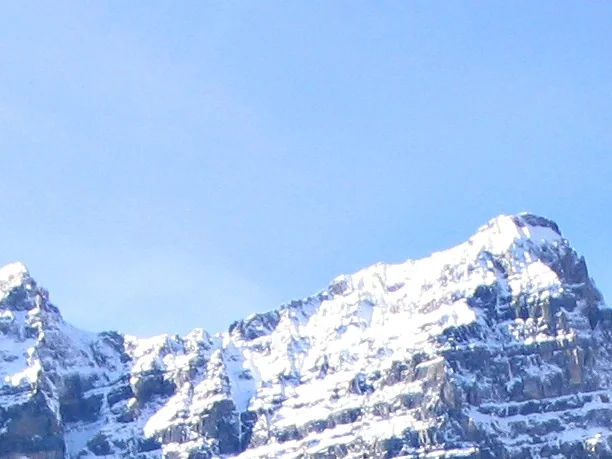
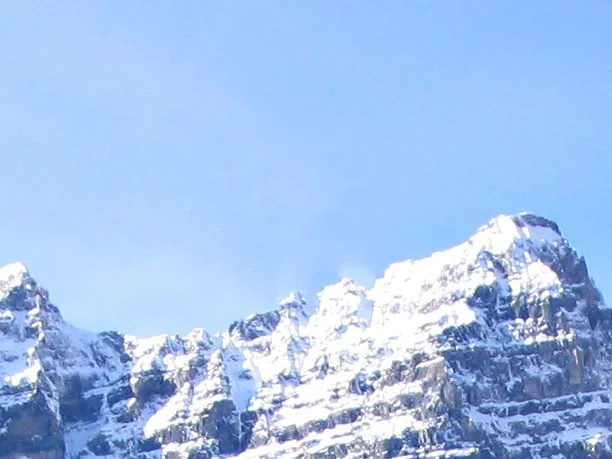
On an Ubuntu 24.04 machine we installed GIMP 3.2.6 from Flathub and the GIMP 3 branch of the plug-ins, selected part of our test photo and ran Heal Selection from a script inside GIMP. It finished without errors. Before and after:
What Flathub offered for GIMP when we checked (November 1, 2026). Only the branch named 3 works with GIMP 3; the 2-40 and 2-3.36 branches are for GIMP 2.10:
| Flathub plug-in | GIMP 3 branch | GIMP 2 branches only |
|---|---|---|
| Resynthesizer | 3.0.1 | |
| G’MIC | 4.0.6 | |
| Fourier | 0.4.5+gimp3rc1 | |
| BIMP, LiquidRescale, Lensfun, FocusBlur | none | yes |
Full list: flathub-plugins.txt. Menu entries and the Heal Selection result: plugin-probe.json. The test ran without PhotoGIMP; PhotoGIMP does not touch plug-ins either way (below).
How to install a plug-in by hand
Close GIMP
GIMP scans plug-ins only at startup.Find the plug-ins folder
Edit → Preferences → Folders → Plug-ins lists where GIMP looks. The one inside your settings folder (for example%APPDATA%\GIMP\3.2\plug-ins) is yours to write to.One folder per plug-in
GIMP 3 expects each plug-in in its own sub-folder with the same name as the plug-in file:plug-ins/my-plugin/my-plugin.py. A loose file directly inplug-insis ignored.Make it executable (Linux and macOS)
Python and Script-Fu plug-ins need the executable bit:chmod +xon the file.Start GIMP and look in the menu
The plug-in’s documentation names its menu. If it is missing on Linux or macOS, start GIMP from a terminal and read the messages it prints.
Installers (G’MIC on Windows) and Flatpak extensions do all of this for you. Plug-ins written for GIMP 2.10 do not work in GIMP 3: the plug-in interface changed.
PhotoGIMP and plug-ins
PhotoGIMP neither adds nor removes plug-ins, and installing or removing it does not touch the plug-ins folder. Its plug-in-settings folder only holds remembered values for GIMP’s own JPEG and PNG dialogs and the unit editor (what each file does). Plug-ins you install keep working with PhotoGIMP. They do not get Photoshop shortcuts, but you can assign keys in Edit → Keyboard Shortcuts.
Questions
Does PhotoGIMP include Resynthesizer or content-aware fill?
Does Resynthesizer work in GIMP 3.2?
Do GIMP 2.10 plug-ins work in GIMP 3?
Can GIMP use Photoshop plug-ins (.8bf)?
Keep going
Found something wrong or out of date? Tell us: hello@photogimp.org. We fix mistakes within a day.